How to Run a Timed Promo on Your Framer Site Without Republishing
Schedule Framer announcement bars and popups with start and end dates. Launch flash sales and limited offers automatically—no redeploy, no midnight Framer edits.
TL;DR
Timed promos need start and end dates, not manual publishes. With BannerFlex, you schedule campaigns in the dashboard; your Framer site shows the right banner automatically—and hides it when the promo ends. No republishing required.
Introduction
Flash sales, product launches, and seasonal offers all have something in common: they expire.
On Framer, that usually means someone opens the project at 8:55pm, updates the announcement bar, publishes, then does it again on Monday to remove it. It works—until you're running multiple promos across time zones or your marketing team can't access the canvas.
Scheduled banners fix that. You set the rules once; the system handles go-live and takedown.
Why republishing hurts conversion campaigns
Every manual publish adds friction:
- Delay — Sales start late because someone wasn't at their laptop
- Risk — Old promos stay live because removal was forgotten
- No audit trail — Hard to see what was live when
For conversion-focused teams, campaign timing is the product. A bar that goes live at the wrong hour costs real money.
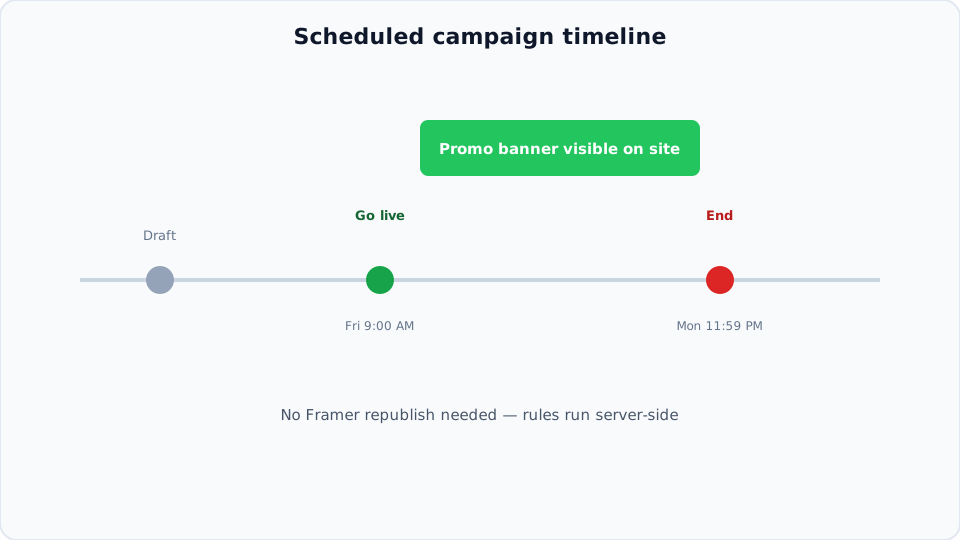
BannerFlex runs schedule checks server-side. Your Framer site asks "should this campaign show?" on each visit. When the clock hits your start time, visitors see the promo. When it ends, they don't.
Step-by-step: your first timed promo
1. Install BannerFlex in Framer
Add the plugin from the Framer Marketplace and connect your account. Drop an announcement bar or popup component on the page.
2. Create a campaign in the dashboard
- Name it (e.g. "July flash sale")
- Set start date/time and end date/time
- Add your copy, CTA link, and creative
3. Preview before go-live
Use BannerFlex preview links to see exactly how the bar looks on your live layout—desktop and mobile—before the schedule starts.
4. Let it run
When the promo ends, the banner disappears automatically. No second publish.
Use cases that benefit most
- Weekend flash sales — Friday 9am → Sunday midnight
- Product launch week — Teaser bar that swaps to "Buy now" on launch day
- Webinar countdown — Bar visible only during registration window
- Holiday shipping deadlines — Urgency message with a hard end date
Tips for higher conversion
- Match urgency to reality — End dates should mean something
- Timezone awareness — Confirm when "midnight" applies for your audience
- One primary CTA — "Shop now" beats three links in a timed bar
- Plan takedown — Scheduled end = no embarrassing stale promos
Next steps
Stop republishing Framer for every promo. Schedule once, convert on time.